What we’re trying to do
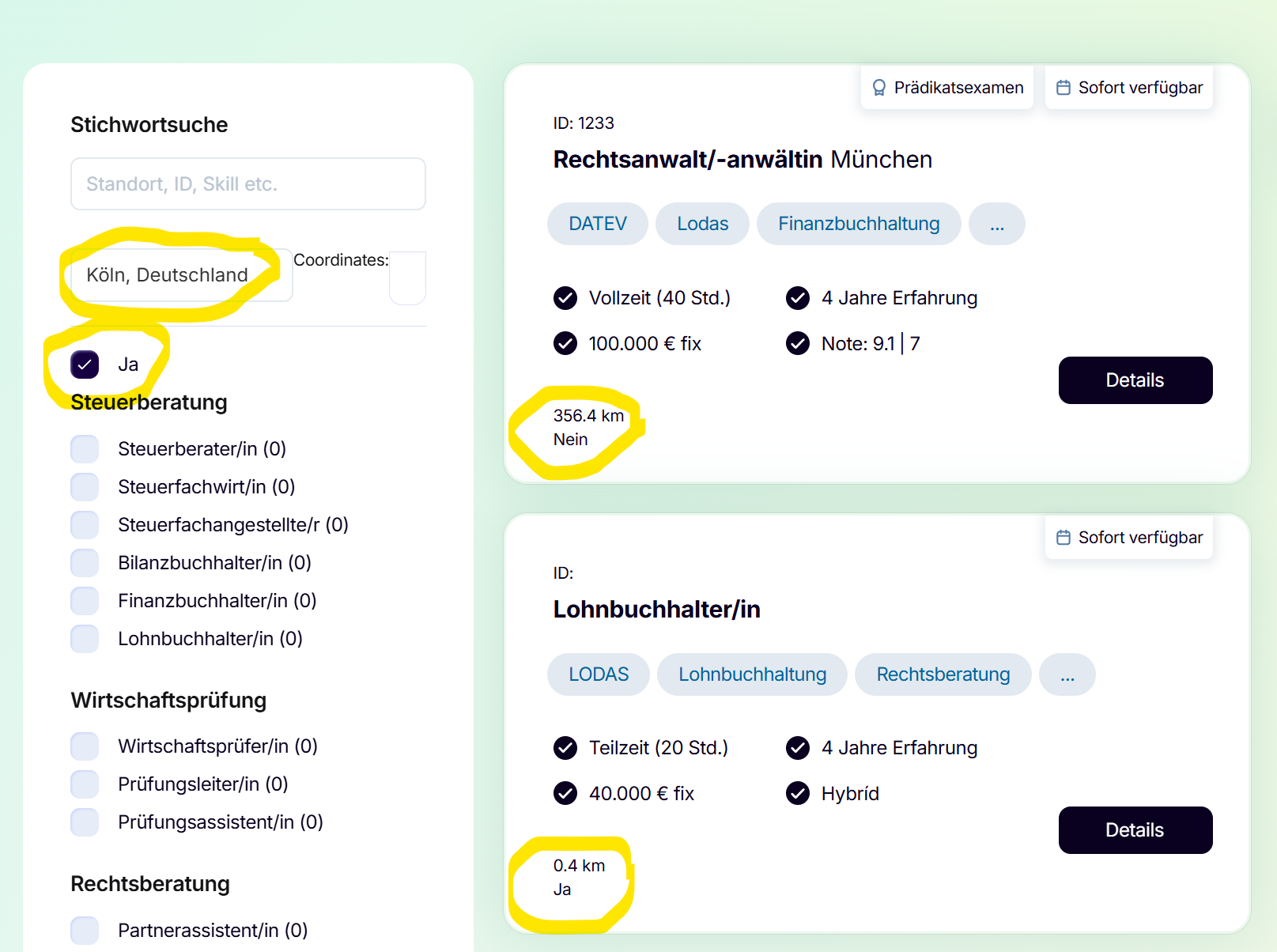
We want to filter CMS items based on a dynamic radius calculation:
-
User selects a ZIP code via Google Maps Autocomplete
-
We calculate the distance from that ZIP to each CMS item (lat/lng stored as CMS fields → added as data-lat, data-lng, data-radius on each item)
-
Every item that is within the radius has a textfield that is filled via js with “Ja” (calculated dynamically)
-
A checkbox should act as a toggle to show only items within their individual radius.
<input type="checkbox" id="radiusYesCheckbox">
-
The checkbox is set as true as soon as a zip code is entered - Hoping that the finsweet filter is kicking in and filtering the list (disclaimer: it doesnt)
cb.checked = true;
cb.dispatchEvent(new Event("change", { bubbles: true }));
But List Filter v2 does not respond to the checkbox being checked:
Is there a correct way to:
-
Use a checkbox as a custom trigger for filtering (not tied to a CMS field)?
-
Tell List Filter v2 to re-run filtering when this checkbox changes?
-
Integrate a custom filtering condition (radius logic) with the List Filter system?
Any guidance on how to properly register a checkbox as a filter trigger — or how to manually make List Filter re-filter — would be super appreciated.
URL: https://talnt-2025.webflow.io/
Thanks for you support 
Sarah
Required Script in head:
<script async type="module"
src="https://cdn.jsdelivr.net/npm/@finsweet/attributes@2/attributes.js"
fs-list
></script>
Checkbox
<input type="checkbox" id="radiusCheckbox" fs-list-field="radius-toggle">
CMS List wrapper
<div fs-list="list">
  <!-- your CMS items -->
</div>
Filters wrapper
<form fs-list="filters">
  <!-- radiusCheckbox lives here -->
</form>
Each CMS Item (store lat/lng + radius)
<div class="item"
     data-lat="48.12345"
     data-lng="11.56789"
     data-radius="30">
  <!-- Your job card content -->
</div>
Complete radius filtering script
<script>
window.FsAttributes = window.FsAttributes || [];
window.FsAttributes.push([
  'list',
  (listInstances) => {
    const list = listInstances[0];

    // The checkbox toggle element
    const radiusCheckbox = document.getElementById("radiusCheckbox");

    // Global user location variables (fill these when ZIP is selected)
    let userLat = null;
    let userLng = null;

    // Haversine distance (km)
    function calculateDistance(lat1, lon1, lat2, lon2) {
      const R = 6371;
      const dLat = (lat2 - lat1) * Math.PI / 180;
      const dLon = (lon2 - lon1) * Math.PI / 180;

      const a =
        Math.sin(dLat/2) * Math.sin(dLat/2) +
        Math.cos(lat1 * Math.PI/180) *
        Math.cos(lat2 * Math.PI/180) *
        Math.sin(dLon/2) * Math.sin(dLon/2);

      return R * (2 * Math.atan2(Math.sqrt(a), Math.sqrt(1-a)));
    }

    // ---- 🔥 Dynamic filter logic (THIS is the magic) ----
    list.dynamicFilters.push((item) => {
      // Checkbox off → show all items
      if (!radiusCheckbox.checked) return true;

      // User has not selected a ZIP → show all items
      if (userLat === null || userLng === null) return true;

      const el = item.element;

      const itemLat = parseFloat(el.dataset.lat);
      const itemLng = parseFloat(el.dataset.lng);
      const itemRadius = parseFloat(el.dataset.radius);

      const distance = calculateDistance(userLat, userLng, itemLat, itemLng);

      return distance <= itemRadius;
    });

    // ---- When checkbox changes → reapply all filters ----
    radiusCheckbox.addEventListener("change", () => {
      list.runFilters();
    });

    // ---- ZIP selection handler (Google Autocomplete) ----
    window.setUserLocationFromZip = function(lat, lng) {
      userLat = lat;
      userLng = lng;

      // Auto-enable radius checkbox (optional)
      radiusCheckbox.checked = true;

      // Re-filter list based on new user coordinates
      list.runFilters();
    };

  }
]);
</script>
How to use
After user picks a ZIP code from Google Autocomplete, run:
setUserLocationFromZip(lat, lng);
This will:
- update userLat / userLng
- automatically enable the checkbox (optional)
- re-run all List Filter logic
- filter items according to your radius
Thanks for your answer, however this seems to not be working unfortunately. I receive the following error:
Uncaught TypeError: list.runFilters is not a function
Are you sure fs-list=“list” & fs-list=“filters” is correct? The Finsweet V2 Doc uses fs-list-element=”list” and fs-list-element=”list”
Thanks again!
Hi @talnt.company
You are absolutely correct, I sort of mixed it up
Sorry & let’s have another go at this
The list wrapper
<div fs-list-element="list">
  <!-- CMS Items -->
</div>
The filters wrapper
<form fs-list-element="filters">
  <!-- checkbox lives here -->
</form>
The cms item
<div class="item"
     data-lat="48.12345"
     data-lng="11.12345"
     data-radius="50">
</div>
For the filtering
<script>
window.FsAttributes = window.FsAttributes || [];
window.FsAttributes.push([
  'list',
  (listInstances) => {
    const listInstance = listInstances[0];

    const checkbox = document.getElementById("radiusCheckbox");
    let userLat = null;
    let userLng = null;

    // Haversine
    function calculateDistance(lat1, lon1, lat2, lon2) {
      const R = 6371;
      const dLat = (lat2 - lat1) * Math.PI / 180;
      const dLon = (lon2 - lon1) * Math.PI / 180;
      const a =
        Math.sin(dLat/2) ** 2 +
        Math.cos(lat1 * Math.PI / 180) *
        Math.cos(lat2 * Math.PI / 180) *
        Math.sin(dLon/2) ** 2;
      return R * (2 * Math.atan2(Math.sqrt(a), Math.sqrt(1-a)));
    }

    // 🔥 Dynamic filter logic using List Filter V2's internal filtering
    const radiusFilter = (items) => {
      // If toggle off or no ZIP → show all
      if (!checkbox.checked || !userLat || !userLng) return items;

      return items.filter((item) => {
        const el = item.element;
        const lat = parseFloat(el.dataset.lat);
        const lng = parseFloat(el.dataset.lng);
        const radius = parseFloat(el.dataset.radius);

        const distance = calculateDistance(userLat, userLng, lat, lng);

        return distance <= radius;
      });
    };

    // Register custom filter
    listInstance.addFilter(radiusFilter);

    // Checkbox → re-filter
    checkbox.addEventListener("change", () => listInstance.filter());

    // Called when ZIP is selected
    window.setUserLocationFromZip = (lat, lng) => {
      userLat = lat;
      userLng = lng;
      checkbox.checked = true;
      listInstance.filter();
    };
  }
]);
</script>
Of course the checkbox remains as is
<input type="checkbox" id="radiusCheckbox" fs-list-field="radius-toggle">
Please let me know how it goes
Thanks