Hey Guys,
I set everything up as per the intro video and then ran my first sync, and everything came across as planned from Airtable → Webflow.
I then changed some things on Airtable and tried to test the sync again, but this time, everything was wiped from Webflow.
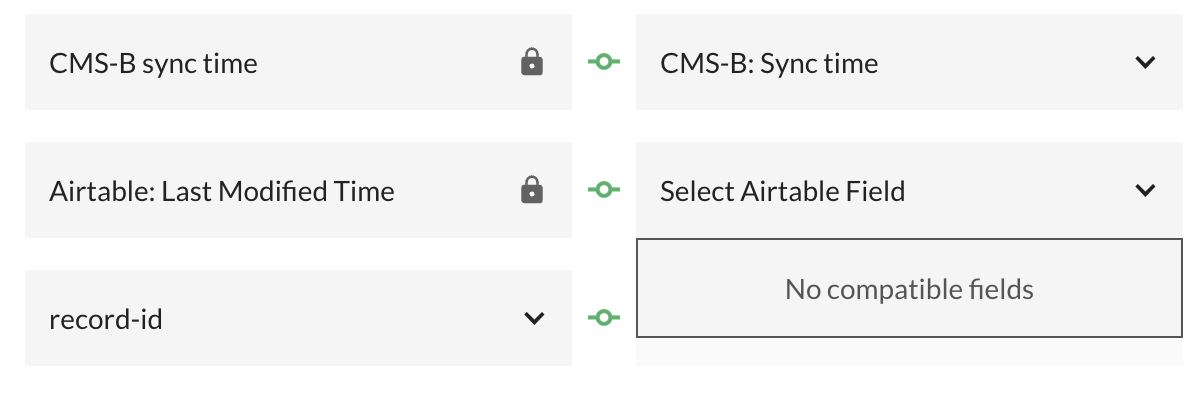
Now i have retored the backup but i am getting an error that :”**Database Sync error: Last modified time field not linked correctly!”
**
Not sure what to do - is this solution robust enough to use for large-scale data on a production site?
if i edit the sync settings - the last modified field gives me no options
So my last modified column seems to have got lost somehow, i made a new one and linked it and the sync is working again.
Hey @pridedesignshane!
Apologies for the inconvenience, I am glad the sync is working correctly now.
The issue was likely with your Last Modified Time field in Airtable. This field is critical. It’s how CMS Bridge determines which records to sync and prevents accidental data wiping.
Hey, yeah - not sure how i disabled it - but working again now.
Just after you sync - the “Ready to Sync” fields are then all out of date (they still say ready to sync), are they supposed to flick back after, or, do you have to reset them? I don’t understand how they help if they don’t reset after syncing?
I’m probably missing something obvious?
Hi @Support-Luis - so just playing around with this some more, some of my items have gone back to Queued to publish in Webflow - so i need to use the “CMS-B Action” tab to push the item live every time i sync, or do i need to just publish in Webflow?
Guess i’m just looking for the best workflow.
When my client updates a record in airtable, they set READY FOR SYNC and it updates the LAST MODIFIED field automatically, which includes it in the next sync - but do they then need to publihs the item in Webflow as they seem to be set to QUEUED FOR PUBLISH - or, should they use the CMS-B” column in Airtable to tell it to push it live before the sync?
Hi @Support-Luis - so picking up the project again, and i ran a big sync, and it seems to have emptied out an unrelated Collection list, does that make any sense?
The only thing i can think of that might have caused this is that on one of my syncs, there’s a field called VENUE and my collection list, which was not attached to any of my syncs, was called VENUE.
Is this a known bug or something? I had about 6 items in that collection, and they’re all gone.
Also, slightly worried that my previous replies didn’t get answered, this is a paid-for app, I had hoped that’d mean there’s a good level of support for people asking questions.
Just to add - I had removed a bunch of CMS items from Webflow and reset all the content in Airtable before running the sync again, I’m guessing this might have been the mistake?
I will occasionally need to reset the content entirely, as our leagues go from winter/spring/summer … whats th ebest idea for removed the old content on both aitrable and webflow without getting undesirable outcomes?
Hey @pridedesignshane!
Apologies for the delay. I’ll try to answer all your questions here.
so i need to use the “CMS-B Action” tab to push the item live every time i sync, or do i need to just publish in Webflow?
You can use the CMS-B Action tab to push the items live after the sync or stage them for when you publish the page in Webflow. Whatever works best for you!
When my client updates a record in airtable, they set READY FOR SYNC and it updates the LAST MODIFIED field automatically, which includes it in the next sync - but do they then need to publihs the item in Webflow as they seem to be set to QUEUED FOR PUBLISH - or, should they use the CMS-B” column in Airtable to tell it to push it live before the sync?
You can edit your Last Modified field in AirTable to update only when the CMS-B Action field is modified, allowing you to set the item to go Live as soon as the sync is complete.
emptied out an unrelated Collection list, does that make any sense?
The only thing i can think of that might have caused this is that on one of my syncs, there’s a field called VENUE and my collection list, which was not attached to any of my syncs, was called VENUE.
Is this a known bug or something? I had about 6 items in that collection, and they’re all gone.
If the collection is unrelated and not selected in AirTable, that collection should not be affected at all 
I will occasionally need to reset the content entirely, as our leagues go from winter/spring/summer … whats th ebest idea for removed the old content on both aitrable and webflow without getting undesirable outcomes?
I’ll have to double check this with the team! I’ll get back to you.